

 GeneaNet offers to build your family tree template.
The template is divided into different sections as follows: Individual, Parents, Spouses and Children, Siblings, Family Link, Extended Family, Notes, Sources, and Family Tree Preview.
You can specify the information you want to be displayed in each section (Basic, Extended, Full, With Pictures) and you can choose a family tree preview theme (3-Generation Family Tree Chart, 3-Generation Family Tree Chart + Family pictures, 4-Generation Family Tree Chart (Vertical), 3-Generation Family Tree Chart (Horizontal)).
Click ‘Presentattion & Browsing’ in the ‘Online Family Tree’ tab of the main menu:

Then click ‘Data’ in the left sidebar:

Or click ‘Presentattion & Browsing’ in the left sidebar of your family tree:

This will open a new page where you can build your family tree template:

Move you mouse over any icon in the left sidebar to preview section, then click the icon to confirm your selection:
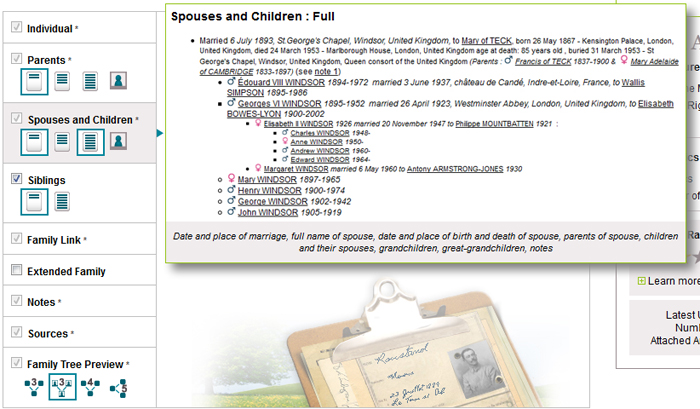
Refresh or reload the page of your family tree to view changes:

10/22/17
Same account separate family tree how I merge?